
NGS Upgrade Hub
Member Online is live. Manage your account anytime, anywhere
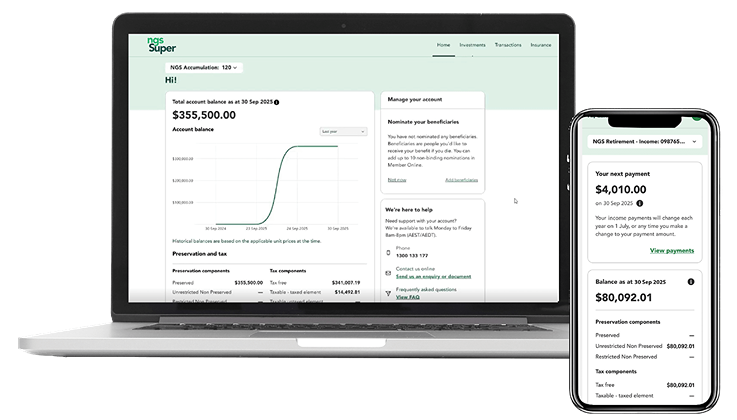
The new Member Online is built for what matters – putting you in control of your super with many features you need in one convenient place.
Whether you’re updating your personal details, checking your balance, finding your BPAY number or generating your Centrelink Schedule, your account information is now at your fingertips anytime, anywhere.
With a streamlined and improved dashboard, more intuitive navigation, and enhanced security, you’ll have a seamless and secure experience to stay on top of what’s important to you.
Learn how to re-registerRe-register for Member Online
Latest update
19 December - Pension payments over the holiday season
We’re upgrading to serve you better
How to re-register for Member Online
Important: You’ll need a mobile number and email address recorded on your NGS account (not shared with another NGS member). If you share an email address with other NGS members, only one person can register using that address.
Calling our Helpline on 1300 133 177 lets you update your contact details but does not complete your registration. You’ll still need to follow the steps below afterwards.
Step 1: Go to the registration page
You can access the registration page now or click the link in our email invite. It will also take you directly to the registration page.
Step 2: Enter your details and Member number
Do not include leading zeros in your Member number. You can find your Member number in:
- The email invite we’re sending you, or
- Other NGS communications you may have already received.
Step 3: Check for your verification email
After entering your details, you’ll receive a separate verification email. Open it and click the link inside to continue.
Step 4: Create your password
Follow the simple rules shown to keep your account secure.
Step 5: Complete registration, then log in
Once registration is complete, you’ll be prompted to log in. Use your email address and new password. We’ll send a one‑time code to your mobile phone by SMS. Have it handy to enter when asked.
How to use Member Online
View our step-by-step video tutorials below to get started with using Member Online. Our FAQs tab also has written instructions.
How to re-register for Member Online
Navigating your Member Online dashboard
Finding your BPAY details
Generating Centrelink schedules
Updating your personal details
Viewing and updating your payments
Viewing and updating your withdrawals
Managing your insurance and making changes to your cover
Switching investment options
Playlist: How-To Guides
How to re-register for Member Online
Navigating your Member Online dashboard
Finding your BPAY details
Generating Centrelink schedules
Updating your personal details
Viewing and updating your payments
Viewing and updating your withdrawals
Managing your insurance and making changes to your cover
Switching investment options
Questions about Member Online
Here you’ll find quick answers to common questions about Member Online, including how to get started, managing your NGS account to making the most of the features available on Member Online.
Accessing Member Online
Member Online features
Managing my account
Transactions and payments
Accessing Member Online
How do I access Member Online?
To access your NGS account online via Member Online, visit the registration page. To get started, you’ll need the email address and mobile number you use with NGS and your Member number. You can find your member number in an email we'll be sending you shortly, if you haven't already received it. For help on getting started, learn how to re-register for Member Online.
When will NGS be launching its App?
I’ve received an email to register for Member Online. Is it from NGS Super?
Yes. We’re emailing members during 3-17 December to advise that Member Online is now available. Emails we send you will appear from NGS Super or [email protected]. If you’re unsure about the authenticity of an email, call our Helpline on 1300 133 177 to verify it.
What do I do if I see a spinning wheel after logging in?
This usually means your browser cache needs clearing. Clearing the cache removes stored website data so the page can reload properly. Follow the steps for your browser below, then try logging in again . We also recommend that you log out of each session to ensure your browser is not storing additional website data that could cause login issues.
If the issue continues after clearing your cache, please call our Helpline on 1300 133 177.
On a computer
If you’re using a desktop or laptop, follow the instructions for your browser below.
Google Chrome
- Open Chrome.
- Click the three dots in the top‑right corner.
- Select Settings → Privacy and security → Delete browsing data.
- Choose "Time range: All time."
- Tick “Cookies and other site data”
- Tick "Cached images and files."
- Select "Delete data" to remove stored website data (this will not affect your passwords or bookmarks).
- Close and reopen Chrome, then try logging in again.
Microsoft Edge
- Open Edge.
- Click the three dots in the top‑right corner.
- Select Settings → Privacy, search, and services.
- Under "Clear browsing data," select "Choose what to clear."
- Set "Time range: All time."
- Tick “Cookies and other site data”
- Tick "Cached images and files."
- Select "Clear now."
- Restart Edge and try logging in again.
Safari (Mac)
- Open Safari.
- Click Safari in the top menu → History Preferences (or Settings on newer macOS).
- Click ‘Clear History’
- Choose Clear ‘All History’
- Click ‘Clear History’
- Restart Safari and try again.
- Go to Advanced and enable "Show Develop menu in menu bar."
- From the top menu bar, click Develop → Empty Caches.
- Restart Safari and try again.
On a mobile device
If you’re logging in from a phone or tablet, use the steps for your mobile browser.
Chrome (iPhone or Android)
- Open Chrome.
- Tap the menu (three dots).
- Tap History → Clear browsing data.
- Select "Time range: All time."
- Tick “Cookies, Site Data”
- Tick "Cached images and files."
- Tap "Clear browsing data."
- Restart Chrome.
Safari (iPhone or iPad)
- Open Settings → Safari
- Tap "Clear History and Website Data."
Microsoft Edge (iPhone or Android)
- Open Edge.
- Tap the menu (three lines).
- Click ‘Delete data’
- Select "Time range: All time."
- Click ‘Browsing data’
- Tick “Cookies and other site data
- Tick "Cached images and files."
- Tap "Clear data."
Next step
If you’re still seeing the spinning wheel after completing these steps, please call our Helpline on 1300 133 177 for more support.
When registering, do I need to include the leading zeros in my Member number?
No. When registering for Member Online, you must not include any leading zeros in your Member number.
For example, if your Member number is 123456, you need to enter 123456 during registration.
I’m getting an error message when I try to register. What do I do?
You may be seeing one of the below error messages when you try to register.
| Error message | What you can do |
|---|---|
| Too many attempts. Check you’ve entered your Member number and date of birth correctly. | You can click Go Back to the previous screen and retry your details again. If the issue persists, please call our Helpline. You can always find your Member number in communications we recently sent you. |
| We don’t have enough information to complete your Member Online registration. | Your internet connection may have briefly disconnected. Please check you have a stable internet connection and try again. If the issue persists, it may mean we need more information from you to allow to you to register. Please call our Helpline for support. |
| Link has expired. | To keep your account secure, we need you to verify the email address you use with NGS. To do this, we send you a one-time link to click on – this link expires within 24 hours. If you see this message, you will need to restart the registration process again. Please check your junk mail in case the one-time link was sent there. If you still did not receive an email, please give us a call on our Helpline. |
We’re here to support you with using Member Online. If you’re still having issues registering, please call our Helpline.
I was registered for Member Online before, why do I need to register again?
Why do I need to verify my contact details to register for Member Online?
I didn’t receive my verification code or I can’t access it. What should I do?
If you haven’t received your verification code:
- Check your junk mail in case the email was sent there.
- If you still haven’t received it, try to request a new code.
If you no longer have access to your email address or mobile number, please call our Helpline to update your contact details so you can complete your registration securely.
I received an SMS from NGS but I didn’t try to register. What should I do?
Can Member Online remember my device or keep me logged in on multiple devices?
Do I need to allow cookies to use Member Online?
Can I let my browser save my password for Member Online?
Which browser or device works best for Member Online?
Can I use Member Online on my phone or tablet?
I’m a member living overseas. Can I re-register for Member Online?
Is my username the same as my Member number?
Does Member Online support accessibility tools such as screen readers?
I can’t log in - what should I check first?
If you’re having trouble logging in, check that:
- You’re using the correct email address and password.
- Your web browser is up to date.
- You have a stable internet connection.
If you have forgotten your password, select ‘Forgot password?’ on the login page to reset it. If you still can’t access your account, please call the Helpline.
Why did Member Online log me out automatically?
For your security, Member Online logs you out after a period of inactivity, or when you update details such as your email address, mobile number or password. This helps protect your account and personal information.
For email address, mobile number or password changes, please follow the verification instructions and once complete, you can simply log in again using your updated details to continue where you left off.
Member Online features
What can I see on Member Online?
You can see your NGS Super account details through Member Online, including your:
- account balance
- investments
- transaction history
- BPAY details to make contributions to your NGS Accumulation account and insurance cover.
You’ll also be able to see your personal details you’ve provided to NGS, including your contact details and communications preferences.
What can I do on Member Online?
Through Member Online, you can:
- update your contact details
- provide us with your tax file number (and avoid paying extra tax)
- consolidate your super
- change your investment options
- apply to change your insurance cover
- access helpful tools and advice
- change your payment amount and frequency for your NGS Income account
- generate a Centrelink schedule for your NGS Income account
- request a withdrawal from your NGS Income account
- update your beneficiaries (non-binding only).
- send us an enquiry through our secure online form – access this under the ‘We’re here to help’ section in Member Online.
I can’t download my statement or form from Member Online. What can I do?
If you can’t download a statement or form, try these steps:
- Make sure your browser is up to date.
- Check that pop-ups and downloads are allowed for Member Online.
- Clear your browser’s cache and cookies.
- Try using a different browser or device.
If you still can’t download the file, call our Helpline and we’ll help you access it.
Can I send NGS a secure message through Member Online?
A page isn’t loading or buttons don’t work - how can I fix this?
If a page isn’t loading properly or buttons don’t respond, try the following steps:
- Refresh the page or close and reopen your browser.
- Clear your browser’s cache and cookies.
- Make sure your internet connection is stable.
- Check that you’re using the latest version of your browser.
- Try accessing Member Online in a different browser or device.
If the issue continues, please call our Helpline for support.
Managing my account
I have multiple NGS accounts (for example, an Accumulation and Income account). Can I see them in Member Online?
Yes. Majority of our members can see all their NGS accounts on Member Online. When you log in, you’ll see your Account number at the top of the homepage. Click on this to open a dropdown of your other accounts. Simply select any account number from the list to view its details.
Please note that Defined Benefit plans will no longer be available on Member Online. We’re still here to support you – you can call our Helpline or book in a chat with our Super Specialists. We’ll also continue to send your account information by post, including your annual statement, so you stay informed.
How current is my account information on Member Online?
Some Member Online account information is updated in real-time, like your personal details and some investment options. Your account balance will be updated daily. Some updates, like employer contributions or certain transactions may take a few days to reflect.
For most requests that you can raise through Member Online, you’ll see a progress update letting you know we’re working on it. This update disappears once your request is complete.
How do I update my personal details on Member Online?
You can easily update this through Member Online anytime, through the following steps:
- Log in to Member Online.
- From your dashboard, click on your initials from the top right corner. This opens a menu, where you can view and edit your personal details, contact details, password settings and your Tax File Number (TFN). You can click on any item to make changes directly in Member Online, except for personal details, which requires you to download and complete a form.
- To update your contact details, select Contact details. This opens a menu where you can update your residential address, postal address, email, mobile number, landline number, and preferred contact method. Click on any details you want to update and follow the prompts.
- When you’re done making changes, simply click Save to make the change.
Please note that if you update your email address, this will also update your login for Member Online. For security purposes, if you change your email address, mobile number or password, you’ll be signed out of Member Online and will need to log back in using your new details.
How do I update my insurance details on Member Online?
To update your insurance details, you can access TAL’s insurance portal through Member Online.
- Log in to Member Online.
- On your home screen, click Insurance on the top right menu.
- You’ll see your insurance details, like your cover type, amount and monthly cost. This is also the place to start if you want to make changes to your cover or make a claim.
- To make changes to your cover, click Manage your cover.
- A disclaimer will appear to let you know you’ll be taken straight to TAL’s insurance portal – which also has been improved – there will be no need to log in again. Please read the disclaimer and click Confirm to continue.
- From TAL’s insurance portal, you can request the changes you need to make to your insurance.
How do I change my investment options on Member Online?
You can change your investment options through Member Online anytime, through the following steps:
- Log in to Member Online.
- If you have multiple NGS Super accounts, make sure you’re viewing the one you want to update. Switch through your accounts by clicking on your account number at the top and selecting the account number from the dropdown menu.
- On your home screen, click on Investments.
- You’ll then see a snapshot of your current contributions and future contributions. From here, click on Change investments.
- Select whether you want to update your current allocations, future allocations, or both.
- On the next screen, type in the percentage or proportion you want to allocate to one or more options. Simply type an amount into the open text field next to each option. Check the progress bar at the bottom, it’ll easily add up how much you’ve allocated out of 100%. If you selected to update both current and future allocations, you’ll start with the current allocations then scroll down to make updates for your future allocations.
- Once you’ve finished making your changes and your allocations total to 100%, click Continue.
- Review your changes on the confirmation screen and click Submit change.
- You’ll return to your investment overview, with a notification that your request is in progress.
Note that you won’t be able to make further changes to your investment options until we’ve completed your request, which can take up to 1 business day.
Transactions and payments
Can I deposit money into my account through Member Online?
How do I find my BPAY details on Member Online?
- Log in to Member Online.
- If you have multiple NGS Super accounts, make sure you’re viewing the one you want to access BPAY details for. Switch through your accounts by clicking on your account number at the top and selecting the account number from the dropdown menu.
- On your home screen, select Transactions from the top right menu.
- Scroll to the Grow your super section and click Add contributions.
- Here you’ll see BPAY details for different contribution types – like non-concessional, spouse or partner, or downsizer contributions.
- Click Copy next to the details you need, and you’re ready to copy the BPAY details wherever you need to, to make your contribution.
Can I withdraw money through Member Online?
For NGS Accumulation and NGS Transition to retirement accounts, you need to meet certain conditions before you can make any withdrawals. Find out more at Accessing your super and Accessing your super in retirement. If you’re eligible, you can submit a withdrawal request by completing a Request for withdrawal form.
Withdrawing money through Member Online is a feature that’s available for NGS Income accounts. Simply follow the below steps:
- Log in to Member Online.
- If you have multiple NGS Super accounts, make sure you’re viewing the one you want to withdraw from. Switch through your accounts by clicking on your account number at the top and selecting the account number from the dropdown menu.
- On your home screen, select Transactions.
- You’ll see your recent transactions. Scroll to Request a lump sum withdrawal and click on Request a withdrawal button.
- You’ll see your total account balance. Click on the drop down to select the type of withdrawal – either Full or Partial.
- If you select Full withdrawal, you’ll be provided the relevant form that you’ll need to complete. Just click Download form to get started.
- If you select Partial withdrawal, you can complete the request within Member Online. Just enter the dollar amount – up to your balance listed at the top – and click Continue.
- You’ll see a summary of your request. Confirm everything is correct, and click Submit.
- You’ll return to the Transactions page, with a note that your request is in progress.
Note that you won’t be able to make another withdrawal until we’ve completed your request, which can take up to 3 business days.
How do I generate Centrelink schedules through Member Online?
If you have an Income account or a Transition-to-Retirement account, you can easily request a Centrelink Schedule through Member Online anytime, through the following steps:
- Log in to Member Online.
- If you have multiple NGS Super accounts, make sure you’re viewing the one you want to update. Switch through your accounts by clicking on your account number at the top and selecting the account number from the dropdown menu.
- On your home screen, select Payments.
- In the section titled Centrelink Schedule, click the Find out more button.
- A screen will appear with information on how you’ll receive your Centrelink schedule. Simply click on Request Centrelink Schedule.
You’ll receive an email when your Centrelink schedule is ready to download from the Documents section in Member Online. Simply log back in, select ‘More’ from the navigation, then ‘Documents’.
Back to top
Our major administrative services upgrade is now complete
At NGS, we’re built for what matters: delivering strong investment performance, competitive fees, award-winning, personalised service and advice, and quality products. This transition has been about much more than updating systems – it allows us to enhance the service experience we deliver to you, both now and into the future.
Thank you for your patience and understanding throughout this important upgrade.
With the upgrade complete, here’s what you need to know:
- New member requests and transactions are being processed as normal.
- Employer and personal contributions are being processed and invested as normal.
- Rollovers are now being processed as normal.
- Income or pension payments will continue as per nominated schedule.
- The pension payment due on 25 December will be processed and paid into bank accounts a few days earlier to ensure members receive their payment before Christmas.
- All backlogged requests from the limited service period that had complete information - including transactions, account updates and contributions - have been processed.
Updates
Stay informed with the latest updates on our ongoing administration service upgrade.
19 December - Pension payments over the holiday season
The pension payment due on 25 December will be processed and paid into bank accounts a few days earlier to ensure members receive their payment before Christmas.
3 December – Upgrade complete, Member Online is now live
We’re excited to announce our major administration services upgrade is now complete. This transition has been about much more than updating systems – it allows us to enhance the service experience we deliver you, both now and into the future. Thank you for your patience during this transition.
Introducing Member Online
With our upgrade, we’re also excited to bring you the new Member Online platform, featuring a refreshed dashboard, easier navigation and enhanced security to keep your information safe.
Register today to check balances, manage investments, access BPAY details, generate Centrelink schedules and more. For help on getting started, learn how to re-register for Member Online.
1 December – NGS Super upgrade complete. Member Online launching soon.
Our major administrative services upgrade is now complete.
Thank you for your patience and understanding throughout this important upgrade.
With the upgrade complete, here’s what you need to know:
- New member requests and transactions are being processed as normal.
- Employer and personal contributions are being processed and invested as normal.
- Rollovers are now being processed as normal.
-
Income or pension payments will continue as per nominated schedule.
-
All backlogged requests from the limited service period that had complete information - including transactions, account updates and contributions - have been processed.
Member Online – we’re putting the final touches on our new and improved Member Online. You’ll soon receive an email with everything you need to know – including how to register and start accessing your NGS account online.
24 November – We’re working through our backlogs
Thank you for your continued patience during the limited service period. We are now processing requests and contributions received during the upgrade and expect some short-term delays while we clear the backlog. When processing your requests, the effective date and unit price applied will be the date of processing.
If you receive Income or Transition to Retirement (TTR) account payments, these will continue as per your nominated schedule:
-
Fortnightly payments from 11 December
-
Monthly payments from 15 December
-
Quarterly, six-monthly and annual payments due on or after 15 December will be paid as per your existing schedule before the start of our limited service period.
Full services are expected to resume by late November, once we’ve completed processing outstanding requests – we’ll confirm this in our next communication. You can always visit the NGS Upgrade Hub for the latest updates.
This upgrade will deliver a more streamlined, reliable service, ensuring better support for you now and into retirement.
17 November – Member Online is unavailable as we progress with our upgrade
Thank you for your patience as we continue our administration service upgrade to improve your experience with NGS Super.
Our limited service period began on 23 October, and we’re pleased to share that the upgrade is progressing well. Your account information and super remains secure and invested.
We’re still receiving your requests and contributions, and we will begin processing after 23 November. Please note there will be temporary processing delays as we work through our backlog of requests.
Member Online is temporarily unavailable
As part of our administration service upgrade, we’re also launching a new and improved Member Online soon – designed to be more user friendly and provide improved functionality.
To complete this transition, Member Online is temporarily unavailable from 5pm AEST 31 October to late November.
Our next communication
We’re excited to deliver smarter digital experiences, better service and stronger support. Keep an eye out for our next update, confirming when full services resume and how to register for Member Online – we’ll send you everything you need to get started. Please note, to keep your account secure online, you’ll need to register for the new Member Online and set up Multi-Factor Authentication (MFA).
You can always refer to the NGS Upgrade Hub for the latest information.
31 October – Member Online is unavailable while we complete our upgrade
As part of our upgrade, we’re launching a new and improved Member Online – designed to be more user friendly and provide improved functionality.
To complete this transition, Member Online will be temporarily unavailable from 5pm AEST 31 October to late November.
We are committed to supporting you during this brief transition. For questions or support, please call our Helpline on 1300 133 177.
When the new Member Online launches, we’ll send you everything you need to get started. To keep your account secure online, you’ll need to register for the new Member Online and set up Multi-Factor Authentication (MFA).
23 October – The NGS Super upgrade has started
Our upgrade is now underway and the limited service period has begun, running from 23 October to late November. We’ll continue to receive new requests from 23 October, and they’ll be queued for processing after 23 November. From 24 November, there will be delays in processing transactions until we have worked through backlogs.
You can continue to access Member Online in read-only mode until 5PM AEST 31 October. This means you can log in and view your account details, balance, current investment holdings, insurance details and beneficiary nominations, and download your statements, but no changes can be made during this time. From 1 November until late November, Member Online will be temporarily unavailable as we complete the upgrade. We’ll be in touch when the new Member Online launches, with clear instructions to help you register and make the most of its key features.
For more details on what the limited service period means for you, please see the Limited service period tab.
Urgent requests such as financial hardship payments, insurance claims or access to urgent funds will continue to be prioritised. If you need help or more information, please call our Helpline on 1300 133 177.
We appreciate your understanding and patience as we work to bring you a more personalised, efficient and improved service experience.
13 October – Consider raising your requests before 23 October
Our upgrade is fast approaching and our short limited service period will run from 23 October to late November. From 5pm AEST 23 October through to 23 November, we’ll queue new requests received during this time and begin processing after 23 November. From 24 November, there will be delays in processing transactions until we have worked through backlogs.
To avoid delays, please consider completing important account updates, switches or transactions before 5pm AEST 23 October. For example, if you anticipate needing a cash payment, consider requesting it now to ensure your funds are available when needed.
If you’re due to receive an income or pension payment during the limited service period, it will be paid in advance to minimise disruption.
For more details on what the limited service period means for you, please see the Limited service period tab.
We’ll be here to support you. We’ll prioritise and process urgent requests such as financial hardship payments, insurance claims or access to urgent funds. If you need help or have any questions, please call our Helpline on 1300 133 177.
Stay up to date
Continue to check the NGS Upgrade Hub – it’s your central place for news and information on the upgrade.
Thank you for your understanding and patience as we upgrade to deliver you a more personalised, efficient and improved service experience.
23 September – Consider actioning your requests
To prepare for our upcoming upgrade, we will have a brief limited service period from 23 October to late November 2025. With one month until 23 October, now is the time to consider taking action on your account to avoid disruption.
Here are some actions you may wish to consider before 5pm 23 October:
- Submitting requests for payments
- Submitting requests for investment switches
- Changing your personal details or beneficiaries
- Consolidating your super
- For new Income or Transition to Retirement (TTR) accounts – you may want to consider starting this process as early as possible to avoid processing delays during the limited service period.
You may also wish to ensure that your member contributions via BPAY have been made before 5pm AEST 28 October.
During this time, we’ll continue to prioritise and process urgent requests such as financial hardship payments, insurance claims or immediate access to urgent funds. Employer contributions – including salary sacrifice and member contributions made via payroll – will also continue to be received between 5pm AEST 24 October and 23 November 2025, with processing to resume after 23 November 2025.
For more details on what the limited service period means for you, please see the Limited service period tab.
Our Helpline will also remain available to support you throughout the upgrade. If you need any assistance or have questions, please contact us on 1300 133 177.
Thank you for your understanding and cooperation as we work to deliver a more personalised, reliable and efficient service to you in the future.
This information is general information only and does not take into account your objectives, financial situation or needs. Before acting on this information, or making an investment decision, consider whether it is appropriate to you and read our Product Disclosure Statements and Target Market Determinations. You should also consider obtaining financial, taxation and/or legal advice tailored to your personal circumstances before making a decision. Financial products are issued by NGS Super Pty Ltd ABN 46 003 491 487 and AFSL 233 154.
3 September – NGS upgrade communications sent to members and employers
We’re upgrading our administration services this October to November 2025 to provide you with a smoother, more personalised experience. By now, you should have received an email or letter explaining this upgrade and what to expect during our limited service period, scheduled from 23 October to late November 2025.
Next communications to keep you informed
As a member, you’ll also receive our Significant Event Notice (SEN) from 9 September, which will provide all the details about the upgrade and upcoming product changes. It’s designed to be your go-to-guide – clear, comprehensive, and easy to refer back to whenever you need.
Your annual statement will also be sent to you starting 15 September.
Haven’t received anything yet?
Your contact details may be out of date. While we’ll continue to provide regular updates on the NGS Upgrade Hub, we encourage you to update your contact details now via Member Online to ensure you receive important information throughout this transition.
22 August – NGS Upgrade Hub launched
This upgrade is part of our commitment to delivering smarter digital experiences, better service, and stronger support. Our priorities remain on delivering strong investment performance, competitive fees, award-winning service and to offer the right products to help members achieve their long-term financial goals.
The NGS Upgrade Hub will be your go-to place for the latest updates and information to help you during this important upgrade.